추천 파이프라인이 만든 장소 데이터를 한 번에 저장해야 하는 구간이 있었습니다. 처음에는 saveAll()과 Hibernate batch 설정이면 충분할 것이라고 생각했습니다. 설정도 단순해 보였습니다.
spring:
  jpa:
    properties:
      hibernate:
        jdbc:
          batch_size: 20
        order_inserts: true
        order_updates: true
하지만 SQL 로그를 확인하자 기대와 달랐습니다. INSERT는 batch로 묶이지 않았고, 데이터가 늘어날수록 저장 시간도 거의 선형으로 증가했습니다. 원인은 단순한 설정 누락이 아니라, MySQL의 IDENTITY 전략과 Hibernate 영속성 컨텍스트가 만나는 지점에 있었습니다.
먼저 “batch가 됐다”는 가정을 버렸습니다
대량 저장 성능을 다룰 때 가장 위험한 가정은 설정을 켰으니 batch가 동작한다고 믿는 것입니다. hibernate.jdbc.batch_size는 batch를 시도할 수 있는 조건을 열어주는 설정이지, 모든 INSERT를 자동으로 묶어주는 보장이 아닙니다.
그래서 먼저 확인해야 할 것은 코드가 아니라 로그였습니다.
@Test
void saveAll_insert_log_check() {
    List<Course> courses = generateTestCourses(10);
    courseRepository.saveAll(courses);
}
작은 데이터 10건으로 확인한 이유는 단순합니다. 수백 건을 넣고 평균 시간만 보면 어디에서 새는지 알기 어렵습니다. 반대로 10건은 SQL이 어떤 순서로 나가는지 눈으로 확인하기 좋습니다.
확인한 패턴은 명확했습니다.
saveAll()호출 중 INSERT가 즉시 실행됐습니다.- 트랜잭션 커밋 직전까지 모였다가 한 번에 나가는 흐름이 아니었습니다.
batch_size: 20을 설정했지만 INSERT가 기대한 단위로 묶이지 않았습니다.
10개 데이터 INSERT 로그 — saveAll() 호출 중 INSERT가 바로 실행되는지 확인한 작은 재현 테스트입니다.
이 시점부터 문제는 “JPA가 느리다”가 아니라 “현재 ID 생성 전략에서는 Hibernate batch가 동작하기 어려운 구조”로 좁혀졌습니다.
병목은 IDENTITY 전략에서 시작됐습니다
문제가 된 엔티티는 MySQL AUTO_INCREMENT 기반의 IDENTITY 전략을 사용하고 있었습니다.
@Entity
public class Course extends BaseEntity {

    @Id
    @GeneratedValue(strategy = GenerationType.IDENTITY)
    private Long id;

    @Column(nullable = false)
    private String name;

    private String address;
    private Double latitude;
    private Double longitude;
}
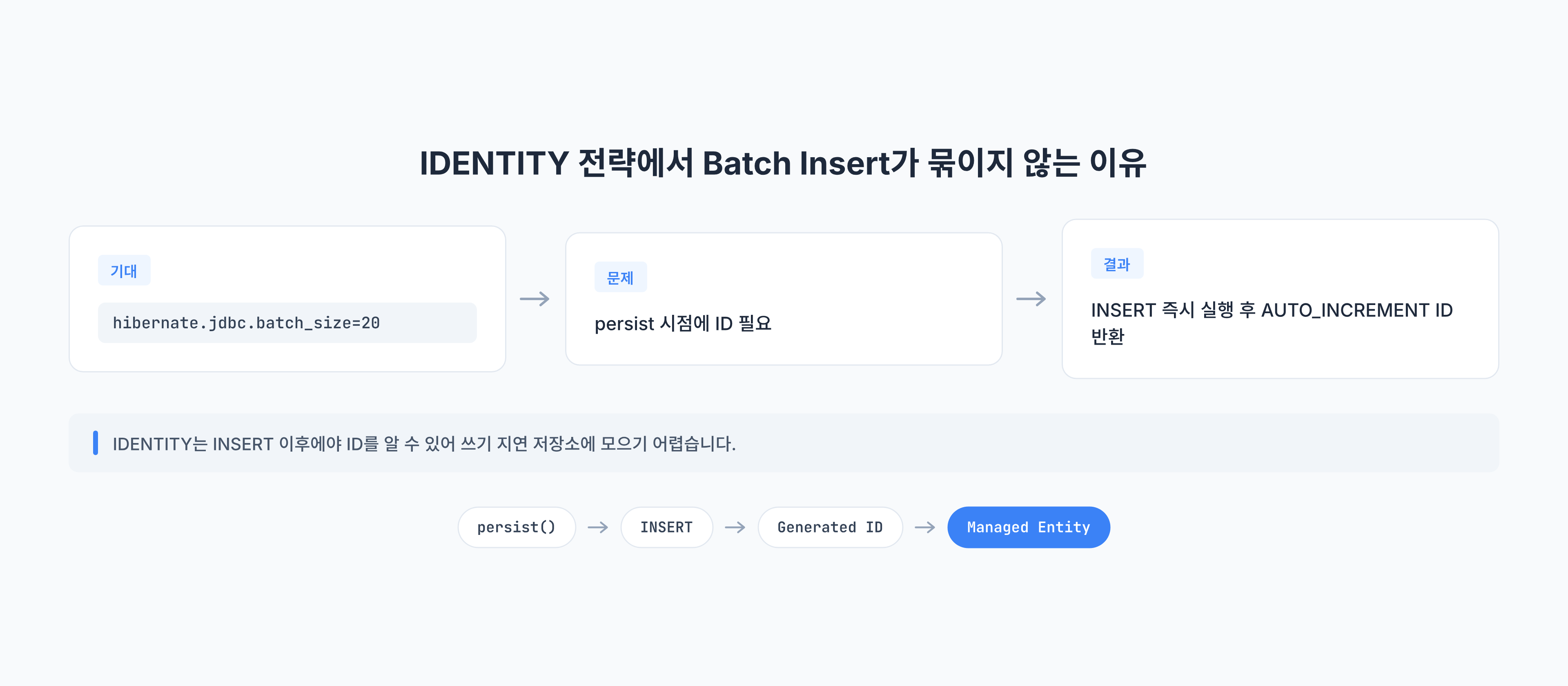
IDENTITY 전략에서는 INSERT가 실제로 실행된 뒤에야 DB가 생성한 ID를 알 수 있습니다. Hibernate는 영속성 컨텍스트에서 엔티티를 관리하기 위해 식별자가 필요합니다. 그런데 INSERT 전까지 ID를 알 수 없다면, Hibernate는 엔티티를 쓰기 지연 저장소에 오래 모아두기 어렵습니다.
흐름을 단순화하면 다음과 같습니다.
- 애플리케이션이
persist()또는save()를 호출합니다. - Hibernate는 엔티티 식별자가 필요합니다.
IDENTITY전략에서는 DB INSERT 이후에야 ID를 받을 수 있습니다.- Hibernate가 INSERT를 즉시 실행합니다.
- INSERT가 쌓이지 않으므로 JDBC batch 효과를 기대하기 어렵습니다.
saveAll은 batch API가 아니라 반복 저장 API에 가깝습니다
saveAll()이라는 이름 때문에 여러 엔티티를 한 번에 저장해줄 것처럼 느껴질 수 있습니다. 하지만 Spring Data JPA의 saveAll()은 기본적으로 여러 엔티티에 대해 save()를 반복 호출하는 추상화에 가깝습니다. 실제 SQL을 어떻게 묶을지는 Hibernate와 JDBC driver, ID 전략, flush 시점의 영향을 받습니다.
따라서 대량 저장에서 확인해야 할 질문은 saveAll()을 썼는지가 아니었습니다.
| 확인할 질문 | 의미 |
|---|---|
| INSERT가 실제로 batch로 묶였는가 | SQL 로그와 driver 설정으로 확인해야 함 |
| ID를 INSERT 전에 확보할 수 있는가 | IDENTITY에서는 어렵고, SEQUENCE 계열은 상대적으로 유리함 |
| 영속성 컨텍스트가 커지고 있지는 않은가 | flush/clear 단위가 필요할 수 있음 |
| 실패한 row를 추적할 수 있는가 | batch size와 chunk 단위가 운영 복구 단위가 됨 |
이 질문에 답하지 않고 batch size만 키우면, 설정은 바뀌었지만 실제 병목은 그대로 남을 수 있습니다.
수치보다 먼저 패턴을 봐야 했습니다
그다음에는 저장 시간이 데이터 수에 따라 어떻게 변하는지 확인했습니다.
@Test
void saveAll_performance_check() {
    List<Course> courses = generateTestCourses(500);

    long startTime = System.currentTimeMillis();
    courseRepository.saveAll(courses);
    long endTime = System.currentTimeMillis();

    System.out.println("총 소요 시간: " + (endTime - startTime) + "ms");
}
당시 측정 결과는 다음과 같았습니다.
- 100개 저장: 약 423ms
- 500개 저장: 약 2702ms
500개 저장 테스트 결과 — 데이터가 늘어날수록 한 건씩 나가는 INSERT 비용이 그대로 누적됐습니다.
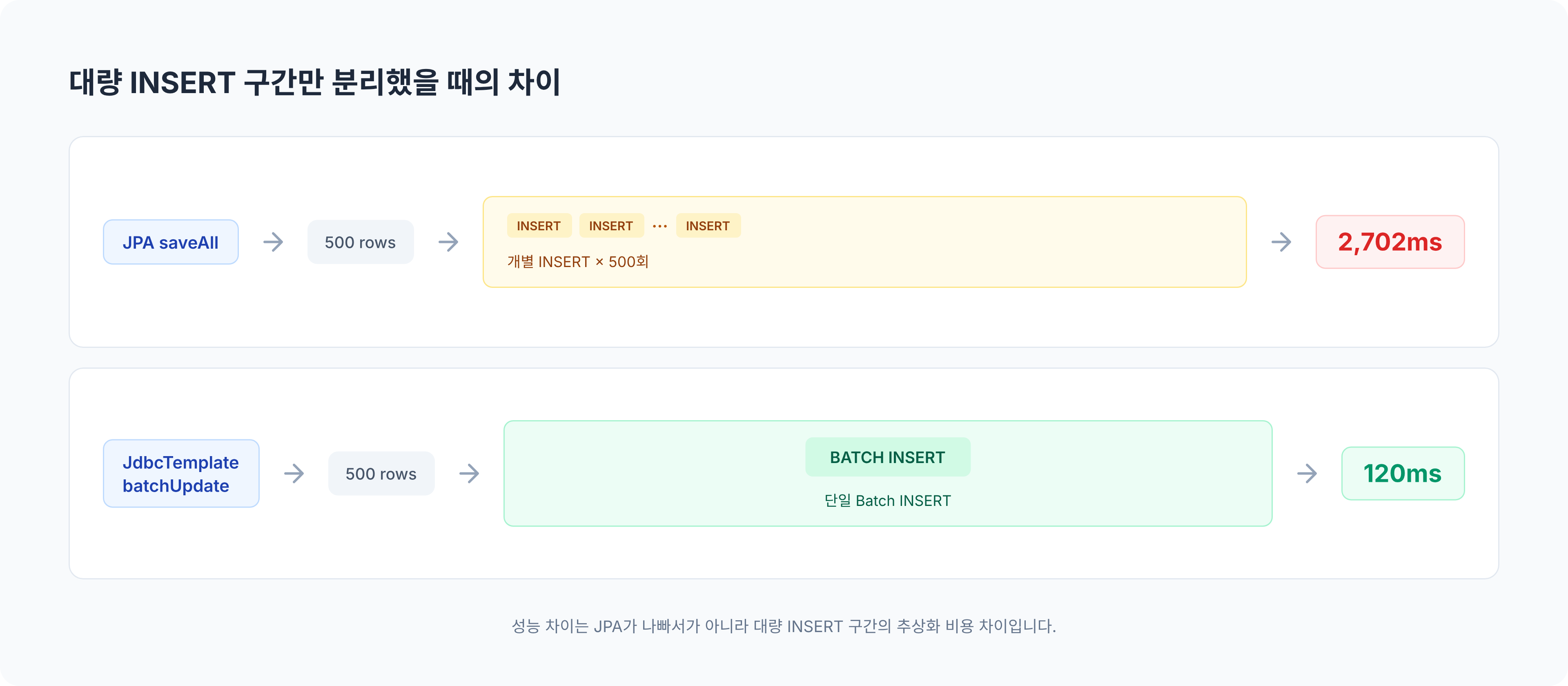
여기서는 절대값보다 증가 패턴을 봤습니다. 데이터가 5배 늘었을 때 시간이 비슷한 비율로 늘어난다면, 기대했던 batch 이점이 크지 않다는 뜻입니다. 저장 시간이 몇 ms인지보다, INSERT round-trip이 실제로 줄었는지를 먼저 봐야 했습니다.
flush와 clear는 다른 문제를 해결합니다
JPA 대량 작업에서 자주 나오는 조언은 일정 개수마다 flush()와 clear()를 호출하라는 것입니다. 이 조언은 맞지만, 해결하는 문제가 다릅니다.
flush()는 영속성 컨텍스트의 변경 내용을 DB로 보냅니다.clear()는 영속성 컨텍스트가 관리하던 엔티티를 비웁니다.
이 둘은 영속성 컨텍스트가 커져서 메모리 사용량과 dirty checking 비용이 증가하는 문제를 줄이는 데 효과가 있습니다.
for (int i = 0; i < courses.size(); i++) {
    entityManager.persist(courses.get(i));

    if (i > 0 && i % batchSize == 0) {
        entityManager.flush();
        entityManager.clear();
    }
}
하지만 IDENTITY 전략 때문에 INSERT가 즉시 실행되는 구조라면, flush/clear만으로 JDBC batch가 갑자기 묶이지는 않습니다. 따라서 문제를 두 층으로 나눠야 했습니다.
| 문제 | flush/clear 효과 | 추가로 봐야 할 것 |
|---|---|---|
| 영속성 컨텍스트 메모리 증가 | 효과 있음 | 처리 chunk 크기 |
| dirty checking 비용 증가 | 효과 있음 | 엔티티 관리 범위 |
IDENTITY로 INSERT 즉시 실행 | 제한적 | ID 전략 또는 JDBC batch 분리 |
대량 INSERT 구간만 JDBC로 분리했습니다
이 문제를 해결하기 위해 JPA를 모두 버릴 필요는 없었습니다. 조회와 도메인 로직에는 JPA가 여전히 편리했습니다. 대신 대량 INSERT가 필요한 좁은 구간만 JdbcTemplate.batchUpdate()로 분리했습니다.
@Repository
@RequiredArgsConstructor
public class CourseBatchRepository {

    private final JdbcTemplate jdbcTemplate;

    public void batchInsert(List<Course> courses) {
        String sql = """
            INSERT INTO course (
                name, address, description, latitude, longitude,
                is_hidden, category, popularity_score, data_source,
                created_at, updated_at
            ) VALUES (?, ?, ?, ?, ?, ?, ?, ?, ?, ?, ?)
            """;

        jdbcTemplate.batchUpdate(sql, new BatchPreparedStatementSetter() {
            @Override
            public void setValues(PreparedStatement ps, int i) throws SQLException {
                Course course = courses.get(i);
                Timestamp now = new Timestamp(System.currentTimeMillis());

                ps.setString(1, course.getName());
                ps.setString(2, course.getAddress());
                ps.setString(3, course.getDescription());
                ps.setDouble(4, course.getLatitude() != null ? course.getLatitude() : 0.0);
                ps.setDouble(5, course.getLongitude() != null ? course.getLongitude() : 0.0);
                ps.setBoolean(6, course.getIsHidden() != null ? course.getIsHidden() : false);
                ps.setString(7, course.getCategory());
                ps.setInt(8, course.getPopularityScore() != null ? course.getPopularityScore() : 50);
                ps.setString(9, course.getDataSource() != null ? course.getDataSource() : "manual");
                ps.setTimestamp(10, now);
                ps.setTimestamp(11, now);
            }

            @Override
            public int getBatchSize() {
                return courses.size();
            }
        });
    }
}
이 선택의 의미는 분명합니다.
- JPA 영속성 컨텍스트를 거치지 않습니다.
- SQL과 파라미터 묶음을 JDBC 레벨에서 직접 다룹니다.
- 엔티티 lifecycle callback, cascade, dirty checking은 이 경로에서 기대하지 않습니다.
- 대량 INSERT가 필요한 구간에만 제한적으로 적용합니다.
JdbcTemplate 성능 비교 결과 — 대량 INSERT 구간만 JDBC batch로 분리했을 때의 차이를 확인한 결과입니다.
같은 환경에서 500개 저장 기준 비교는 다음과 같았습니다.
| 저장 방식 | 500개 저장 시간 | 해석 |
|---|---|---|
JPA saveAll() | 약 2702ms | IDENTITY 전략으로 INSERT가 즉시 실행되는 흐름 |
JdbcTemplate batchUpdate() | 약 120ms | 대량 INSERT 구간을 JDBC batch로 분리 |
이 수치는 특정 로컬 환경의 측정값입니다. 그래서 절대값 자체보다 같은 데이터, 같은 DB, 같은 애플리케이션 경로에서 비교했을 때 INSERT round-trip이 줄어든 패턴이 더 중요했습니다. 성능 숫자는 환경이 바뀌면 흔들리지만, 단건 왕복이 줄었는지와 chunk 실패를 다시 찾을 수 있는지는 환경이 바뀌어도 확인해야 하는 기준입니다.
MySQL driver 설정도 함께 확인해야 합니다
JDBC batch를 사용한다고 해서 항상 DB에 하나의 multi-value INSERT가 전달되는 것은 아닙니다. MySQL Connector/J에서는 rewriteBatchedStatements=true 설정 여부에 따라 batch가 실제 전송 단계에서 어떻게 처리되는지가 달라질 수 있습니다.
spring.datasource.url=jdbc:mysql://localhost:3306/app?rewriteBatchedStatements=true이 설정이 없으면 애플리케이션 코드에서는 batchUpdate()를 호출했더라도, driver가 개별 INSERT에 가깝게 처리할 수 있습니다. 따라서 JDBC batch로 바꾼 뒤에도 다음을 확인해야 합니다.
- SQL 로그 또는 proxy 로그에서 실제 전송 형태가 어떻게 보이는지
- DB 측 statement 수가 줄었는지
- 네트워크 round-trip이 줄었는지
- batch 실패 시 어느 chunk에서 실패했는지 추적 가능한지
프레임워크 API 이름보다 실제 DB로 전달된 요청 형태가 더 중요했습니다.
서비스에서는 JPA와 JDBC를 역할로 나눴습니다
실제 저장 흐름에서는 모든 것을 JDBC로 바꾸지 않았습니다. 중복 검사와 기존 데이터 조회에는 JPA를 사용하고, 새로 저장해야 하는 데이터 묶음만 JDBC batch로 넘겼습니다.
@Transactional
public void saveRecommendedCourses(List<Course> courses) {
    Set<CourseKey> requestedKeys = courses.stream()
        .map(course -> new CourseKey(course.getName(), course.getAddress()))
        .collect(Collectors.toSet());

    Set<CourseKey> existingKeys = courseRepository.findExistingKeys(requestedKeys);

    List<Course> coursesToInsert = courses.stream()
        .filter(course -> !existingKeys.contains(new CourseKey(course.getName(), course.getAddress())))
        .toList();

    courseBatchRepository.batchInsert(coursesToInsert);
}
이 구조에서는 책임이 나뉩니다.
- JPA는 읽기, 중복 검사, 도메인 규칙 확인에 사용합니다.
- JDBC batch는 검증이 끝난 row를 빠르게 넣는 데 사용합니다.
- 저장 직후 영속 상태 엔티티가 필요하다면 다시 조회하거나 다른 경로를 선택합니다.
위 예시는 단건 exists 조회를 반복하지 않는 형태로 바꾼 버전입니다. 실제 대량 입력에서는 INSERT를 빠르게 만들어도 중복 검사에서 row마다 existsByNameAndAddress를 호출하면 다시 N+1 조회가 생깁니다. 그래서 저장 대상의 key를 먼저 모으고, 기존 데이터를 한 번에 조회한 뒤 애플리케이션에서 차집합을 만드는 방식까지 함께 봐야 합니다. 이때 key 집합이 너무 커지면 chunk 단위로 나눠 조회하고, 각 chunk의 입력 수·기존 key 수·최종 insert 수를 로그로 남겨야 실패한 범위를 다시 찾을 수 있습니다. 또한 bulk 조회 자체가 너무 큰 IN 절로 바뀌지 않도록 입력 크기를 제한하고, 같은 key가 입력 안에서 중복되는 경우를 먼저 제거해야 합니다.
즉, JPA와 JDBC는 대체 관계라기보다 쓰기 경로의 성격에 따라 나눠 쓰는 도구에 가까웠습니다.
JDBC batch로 포기한 것도 명확히 봐야 합니다
JDBC batch는 빠르지만, JPA가 제공하는 편의 기능을 그대로 가져오지 않습니다. 이 차이를 무시하면 성능 문제는 해결해도 데이터 모델이 더 불안정해질 수 있습니다.
| JPA 경로에서 기대할 수 있는 것 | JDBC batch에서 직접 챙겨야 하는 것 |
|---|---|
| 엔티티 lifecycle callback | created_at, updated_at 값 설정 |
| cascade와 연관관계 관리 | FK 값과 insert 순서 |
| 1차 캐시와 영속 상태 | insert 후 필요한 값 재조회 |
| 도메인 메서드 기반 검증 | batch 이전 별도 검증 단계 |
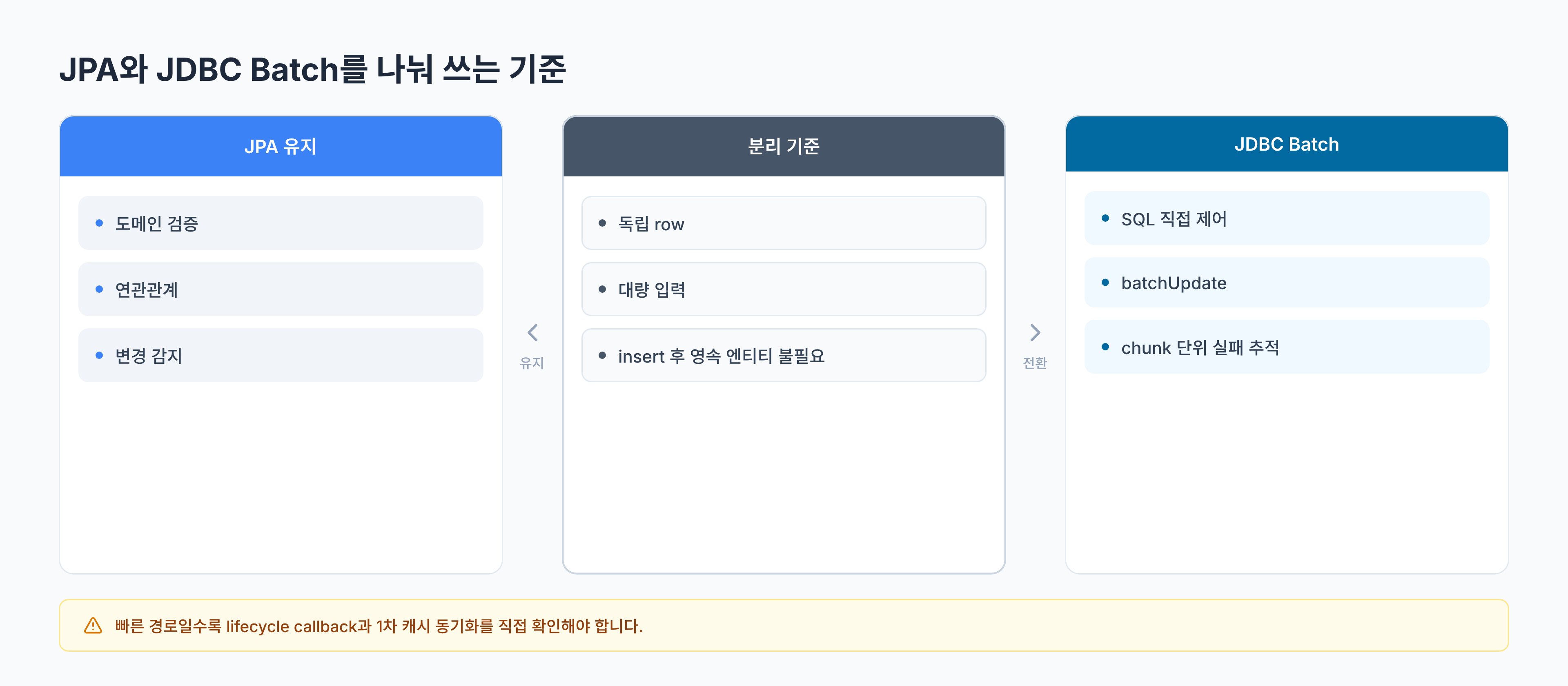
그래서 JDBC batch로 분리하기 좋은 조건도 분명합니다.
- 저장 대상이 독립적인 row에 가깝습니다.
- 연관관계 cascade나 복잡한 도메인 이벤트가 필요하지 않습니다.
- insert 전 검증과 중복 제거가 끝난 상태입니다.
- insert 후 같은 트랜잭션에서 영속 상태 엔티티를 계속 수정하지 않습니다.
- 실패했을 때 chunk 단위로 재처리할 수 있습니다.
반대로 저장 직후 엔티티 그래프를 계속 수정해야 하거나, 도메인 이벤트와 lifecycle callback이 중요한 경로라면 JPA를 유지하는 편이 더 안전할 수 있습니다.
batch size는 성능 값이면서 운영 단위였습니다
batch size는 크게 잡을수록 좋아 보이지만, 실제로는 운영 단위이기도 합니다. 너무 작으면 round-trip이 많이 남고, 너무 크면 실패했을 때 어떤 데이터가 문제인지 찾기 어려워집니다. 메모리 사용량도 함께 증가합니다.
따라서 batch size를 정할 때는 다음 기준을 함께 봐야 했습니다.
- 애플리케이션 메모리 사용량
- DB가 한 번에 처리할 수 있는 statement 크기
- 실패 시 재처리할 chunk 크기
- 로그로 추적 가능한 단위
- 중복 데이터나 유효성 오류가 섞일 가능성
대량 저장은 평균 시간만 빠르면 끝나는 작업이 아닙니다. 일부 row가 실패했을 때 어디까지 성공했고 어디부터 다시 처리해야 하는지도 같이 설계해야 합니다. 특히 chunk 단위로 내려가는 저장 경로에서는 성능보다 먼저 재시도 단위와 로그로 추적 가능한 경계를 정해 두지 않으면, 실패한 데이터 하나 때문에 전체 입력을 다시 밀어 넣는 구조가 되기 쉽습니다.
batch insert를 확인할 때 볼 것
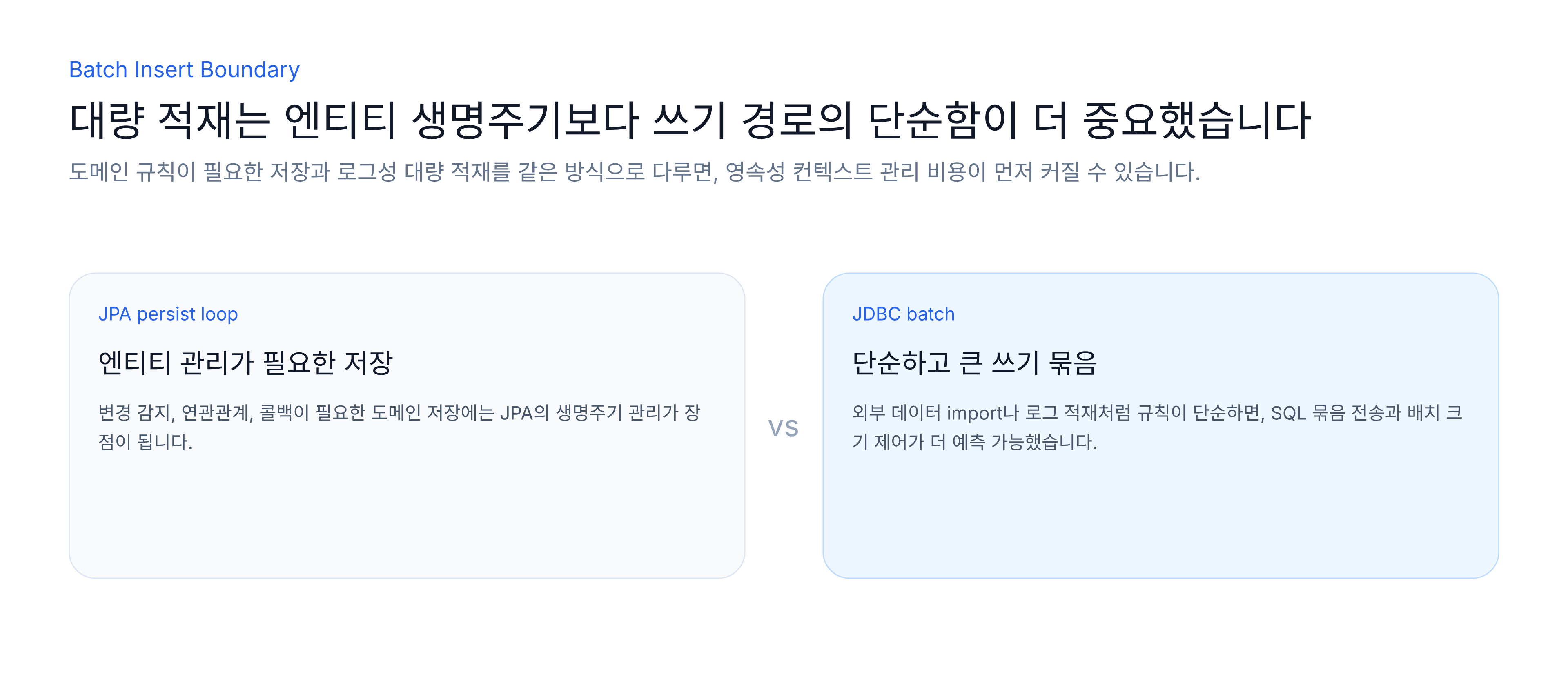
이 문제의 핵심은 JPA가 느리다는 데 있지 않았습니다. MySQL IDENTITY 전략에서는 Hibernate가 INSERT를 지연시켜 모으기 어렵고, 그 결과 saveAll()과 hibernate.jdbc.batch_size만으로는 기대한 batch insert가 나오지 않을 수 있다는 점이었습니다.
saveAll()을 볼 때는 먼저 batch insert라는 이름을 내려놓아야 합니다. saveAll()은 반복 저장을 감싸는 추상화이고, MySQL IDENTITY 전략에서는 INSERT 이후에야 ID를 받을 수 있어 Hibernate batch가 제한됩니다. flush/clear는 영속성 컨텍스트 크기를 관리하는 데는 도움이 되지만, ID 생성 전략이 batch를 막는 문제를 해결하지는 못합니다.
그래서 대량 INSERT가 필요한 좁은 구간은 JdbcTemplate.batchUpdate()로 분리할 수 있습니다. 대신 MySQL에서는 rewriteBatchedStatements 같은 driver 설정까지 확인해야 하고, JDBC batch로 내려간 경로에서는 JPA lifecycle, cascade, 1차 캐시를 직접 기대하면 안 됩니다.
이후 batch insert를 볼 때는 설정 파일보다 SQL 로그를 먼저 봅니다. 실제 INSERT가 묶였는지, ID 생성 전략이 batch를 막고 있지 않은지, rewriteBatchedStatements 같은 driver 옵션이 적용됐는지, 중복 검사도 bulk로 처리되는지 확인해야 합니다. 그리고 JDBC batch로 내려간 구간에서는 JPA lifecycle, cascade, 1차 캐시를 그대로 기대하지 않습니다. batch insert는 설정 하나가 아니라, 대량 쓰기 경로를 어디까지 JPA에 맡기고 어디부터 JDBC로 분리할지 정하는 문제였습니다.